
Learn Substack from a start up not a Ai Guru
Less than 60 days sharing tips and insights.


So as many of us are starting out of the gate here on Substack, I myself opened the door April 30th here 2026.
I am going to share what I am learning here vs you guys paying the AI Guru’s for mass printed junk for your however much subscription. They won’t show you things like this and it will save you days and weeks of time. Don’t give that dood money- hit em’ with the good ol’ flying nut-kick, that’s what we reserve that for.
There will be a button coming on my homepage labeled “Substack” where I will begin publishing free for everyone tips and tricks I am picking up to maximize page aesthetics, user ease, and more importantly spawning engagement and fishing among external search engines. Please feel free to engage, ask questions, drop pointers and tips, and also bring your flavor of what you do and drop a link on yourself. Let us all help one another learn and grow together as best we can.
I went to college early millenium when the internet did not exist, and kept up through its infancy here. One thing I want to talk about is brief and a bit between computer science and marketing here.
Now understand I don’t have a great numbers of subscribers, I have about double the followers as actual subscribers however, I am not and have not at all been advertising on any major social media sites. I don’t even have a FB or Insta, none of that. I am looking for sponsors and partners, but I am not selling content yet, I am simply getting a head start on planting seeds all over the internet.
What Kind of Substack experience do you have?
You are not marketing here on Substack to other creators, If you believed that signing up you are incorrect. It is more like a meat market, and everybody is selling meat. This is basically a store front for you to bring outside perspectives in that may want to pay for your subscription or whatever else you are offering.
Let’s start with this first picture.
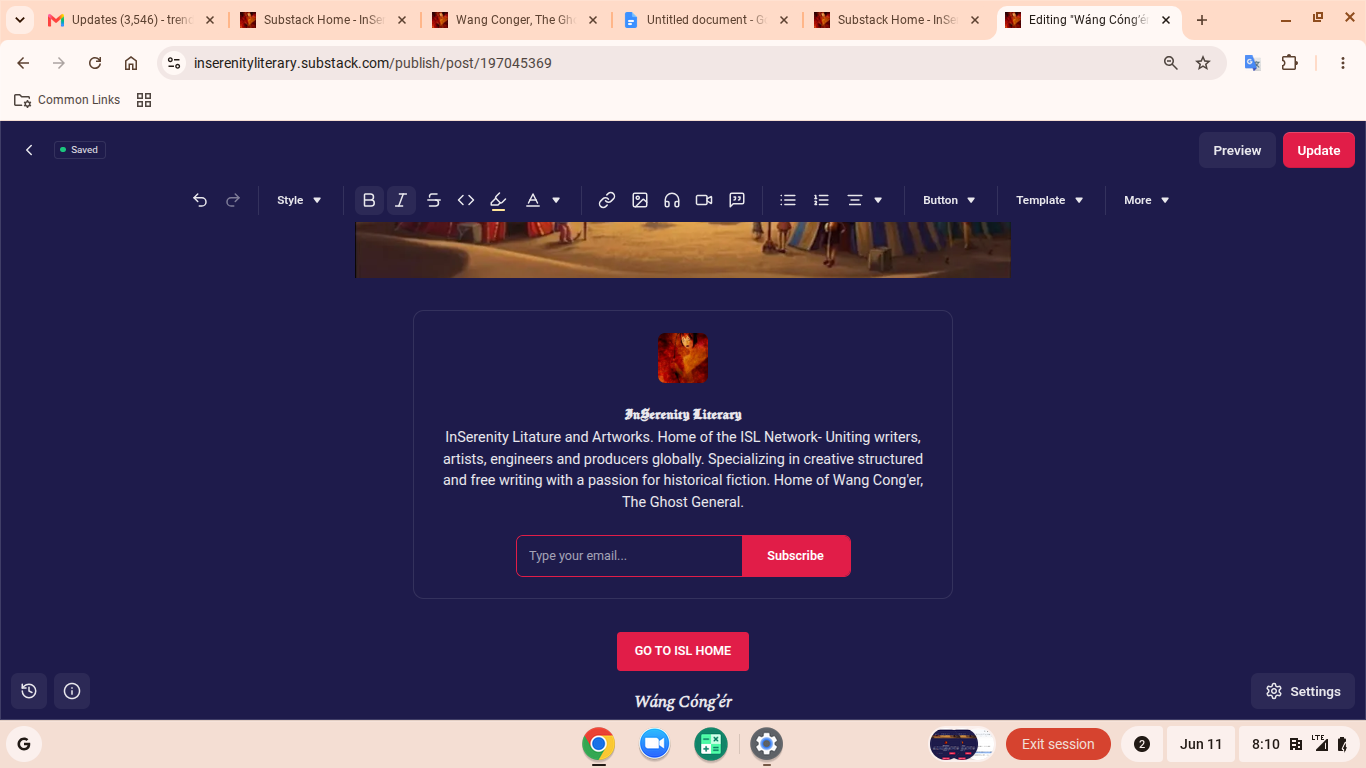
What to pay attention too is not just Substack itself, but the overall chrome display setup- note at the top I have my gmail open on the left tab, 2 substack tabs, and a scrap document tab separating 2 more substack tabs.
I keep it very organized because Substack tabs tend to like to multiply on you and this way I can keep that under tabs 🤣, not end up with multiplicity on my browser, and have a spacer between that I am actually using.
It gets confusing ending up with a dozen Substacks all wanting attention at once.
The Left 2 substacks are a view mode or when I am pulling copy/paste sections off another post I also want on this particular post, ie: stuff like a header setup, or footer that has all your buttons and engagement features. I also use this to test articles I am working on in real time prior to publishing them (and always still find errors 😛)
The Right 2 Substacks are the page I am currently working on in the live editor-
Now this is a cool trick- I am working on a story and it is quite long. I am releasing it broken up into sections of anywhere from 2k-15k words. What I can do with this- is use the “INSERT CUSTOM BUTTON” option. From say page 5, I goto Page 6, copy the URL and paste it into the custom button bottom URL insert then set the top panel option with something like “GO READ PAGE 6 NOW!”- this inserts a direct link from where they currently just ended page 5, directly to the continuation of the story in its next release.
You can also obviously do the opposite to go a page back. It can be optional and personal if it seems a little much- but overall how Substack tracks and handles engagement- it indeed creates more clicks, engagement and shows your viewers more content.
Below are two buttons you want to limit where you put on your page for obvious reasons.
You can test them, these are most definitely great options to know how to use, I would suggest not being overly pushy, display them no more than once per page in a strategically dropped place where you really think you have your readers attention.
These buttons are made by simply going into the button panel and using custom button and inserting the destination URL in the bottom box and whatever you want really in the top box. Let’s have some fun with it and play some psychology into it to increase engagement.
The human is a curious creature.
You can do a lot of cool creative things with these, including making an entire article of nothing but story buttons if you want. here is how i used mine in a way i am trying to play some psychology to at least gain clicks:
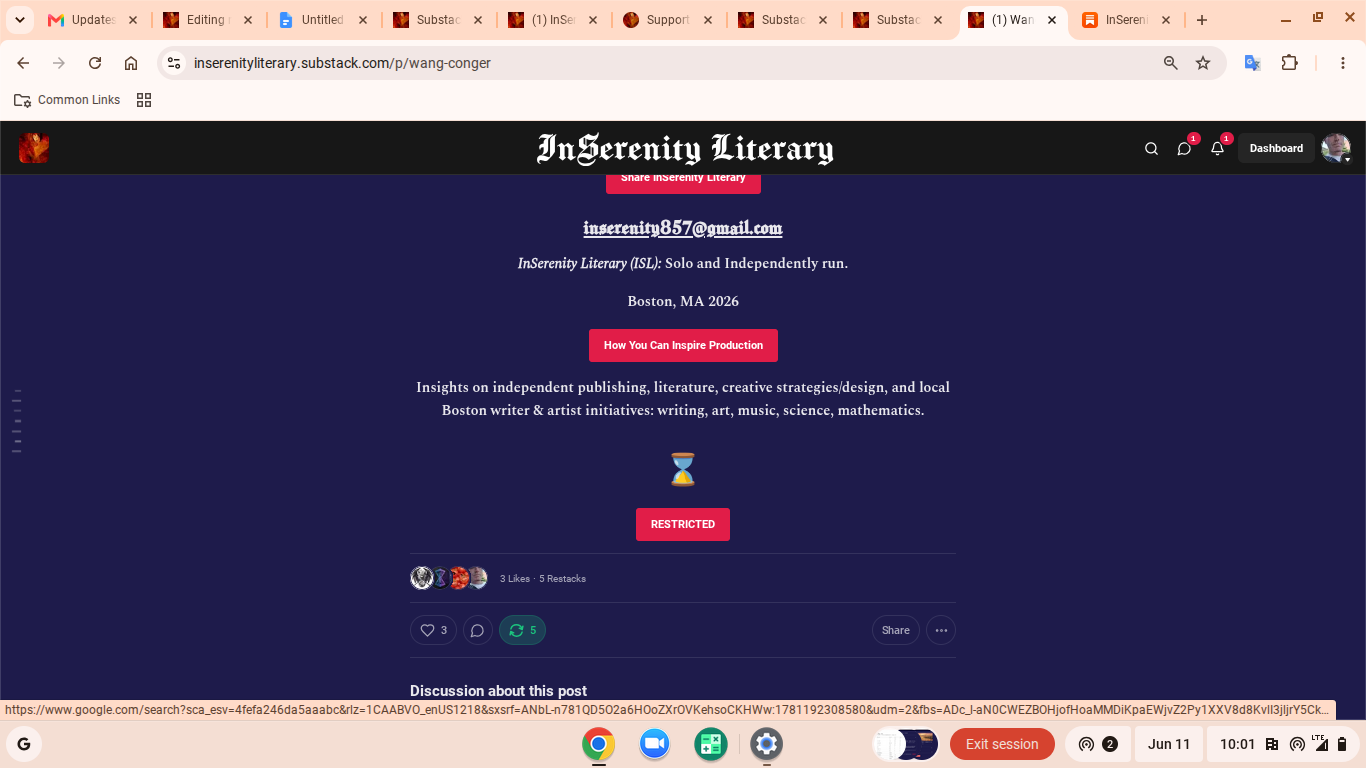
So if you notice here I have put a “RESTRICTED” button in there, i have also used “PRIVATE”, “NOT YET PUBLIC”- I assume people will be a bit curious about what is inside there, and- here is my fun prank it leads them to something like this:
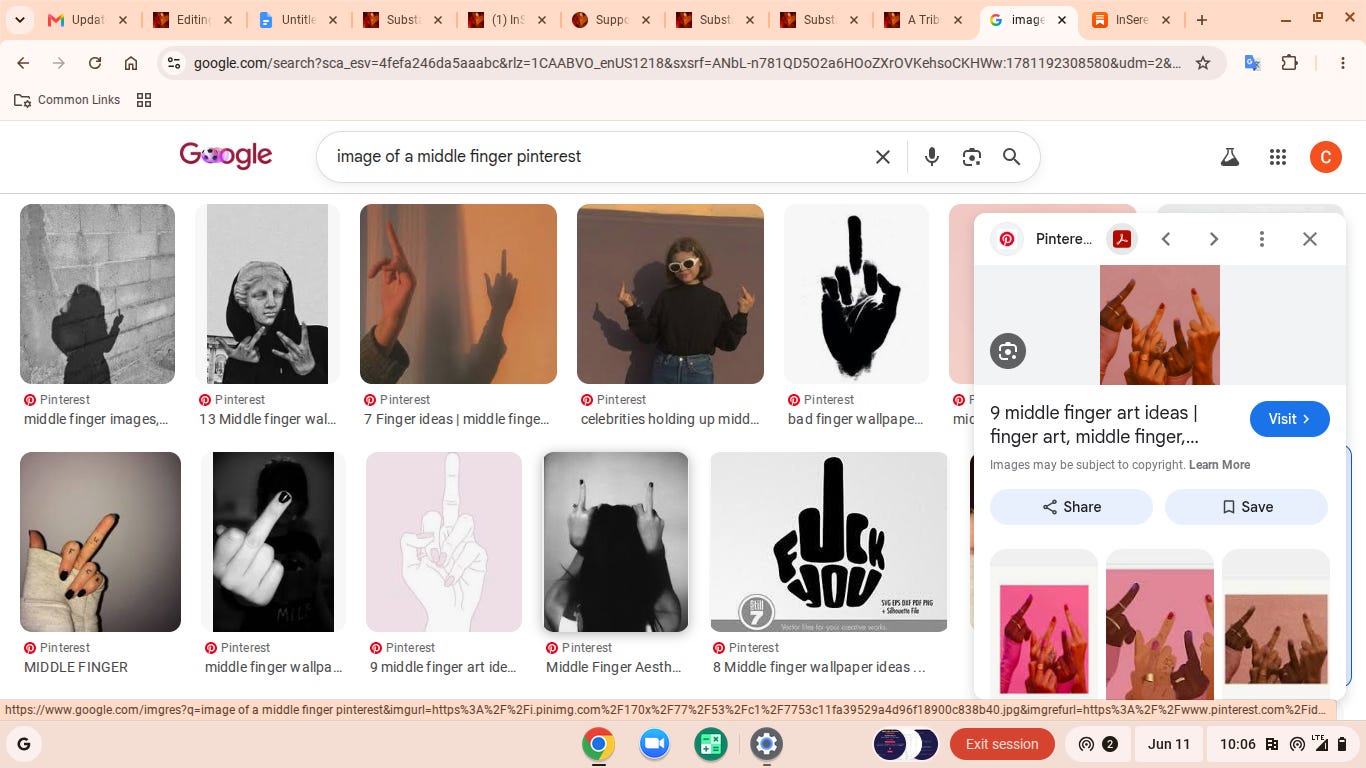
You might lose some people on my particular method, make note to throw up a really BIG “DO NOT TRY THIS AT HOME” on pretty much anything I do, but hey, those that click, some people have a sense of humor, I really don’t want the ones that don’t anyways, back to that flying nut-kick.
The Divider Page
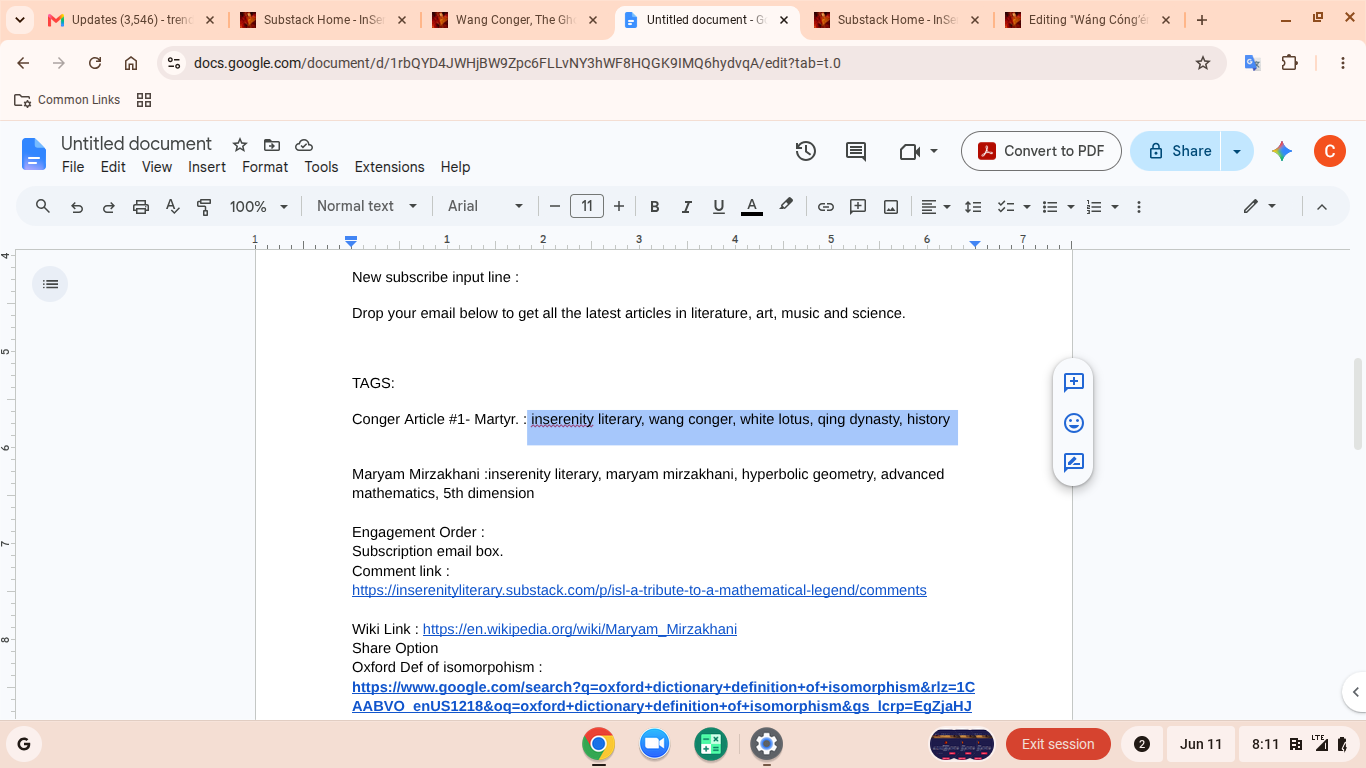
So, because I do a lot in story writing, I am used to keeping character vaults like this in side windows for quick recall, this particular document, is a set of URL tags, and link lists of information I am recycling around alot between articles.
Now I also do a lot of technical writing that requires quite a bit more research than for my story writing. I do not feed AI prompts to feed me research data, I scour it off reputable locations myself. Much of this is posted in my work because when you post scientific data, you are typically required to show work and cite references
This is also very good because putting links does what? It encourages further engagement, more clicks for you, more placement by the ss bot in your notes and articles.
Substack also as well as a TAB button does not have a line insert so keep your inserts and decoratives in a nice ready to go scrap document for fast cut & paste.
Search Placement
Now that we know Substack is a back boiler room of a bunch of chefs all stirring the same pot with their _____. Anyone play mad-libs? COMING SOON TO MY PAGE FOR PRIZES!
(how I insert short promos 🤣- and don’t be afraid to write like the kids use emojis! you wanna catch all the markets! writing like grandma only attracts other grandmas…)
We aren’t looking for customers on substack because it is mostly all sellers. So that note feed is more like a social place however, your words there within the first 293 characters (you know where the “SEE MORE” pops up?!") are highly functional keyword triggers for external search engines : Google, Facebook, Instagram, etc…
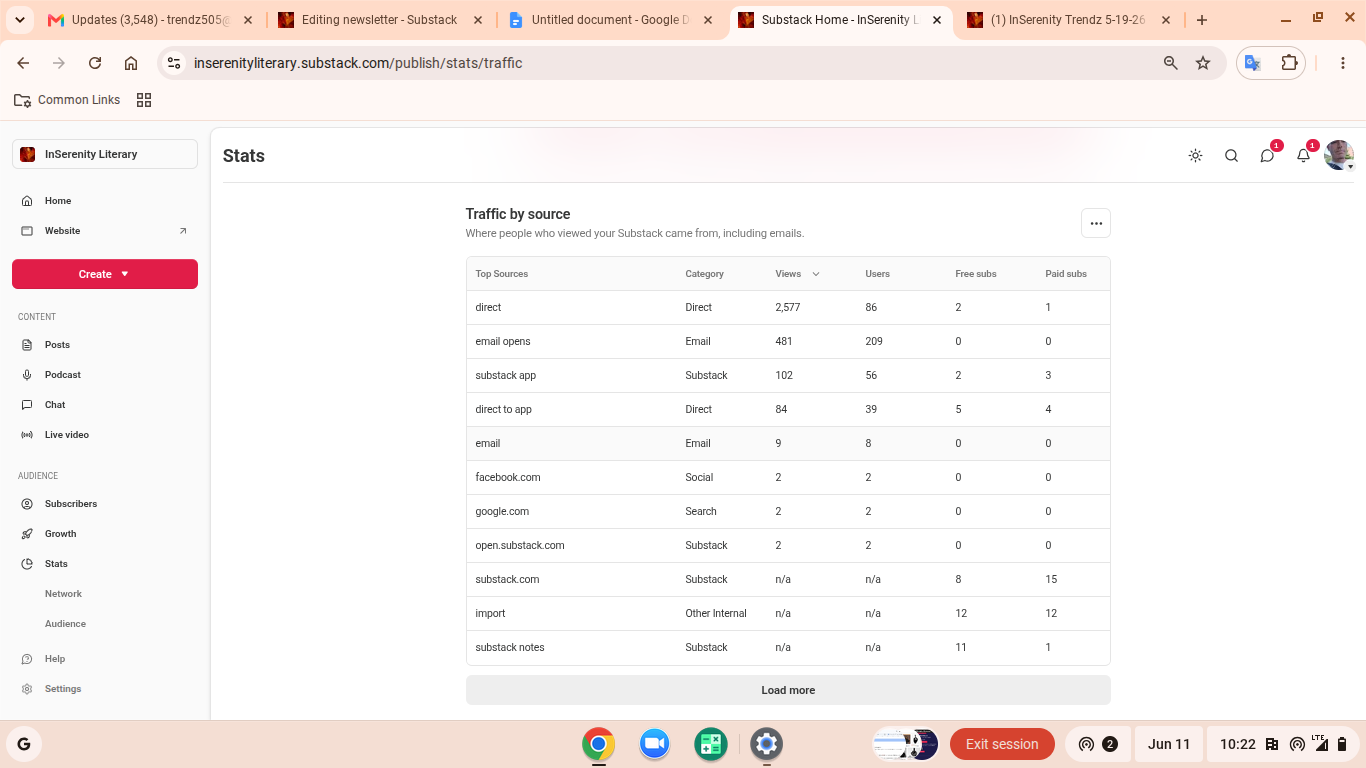
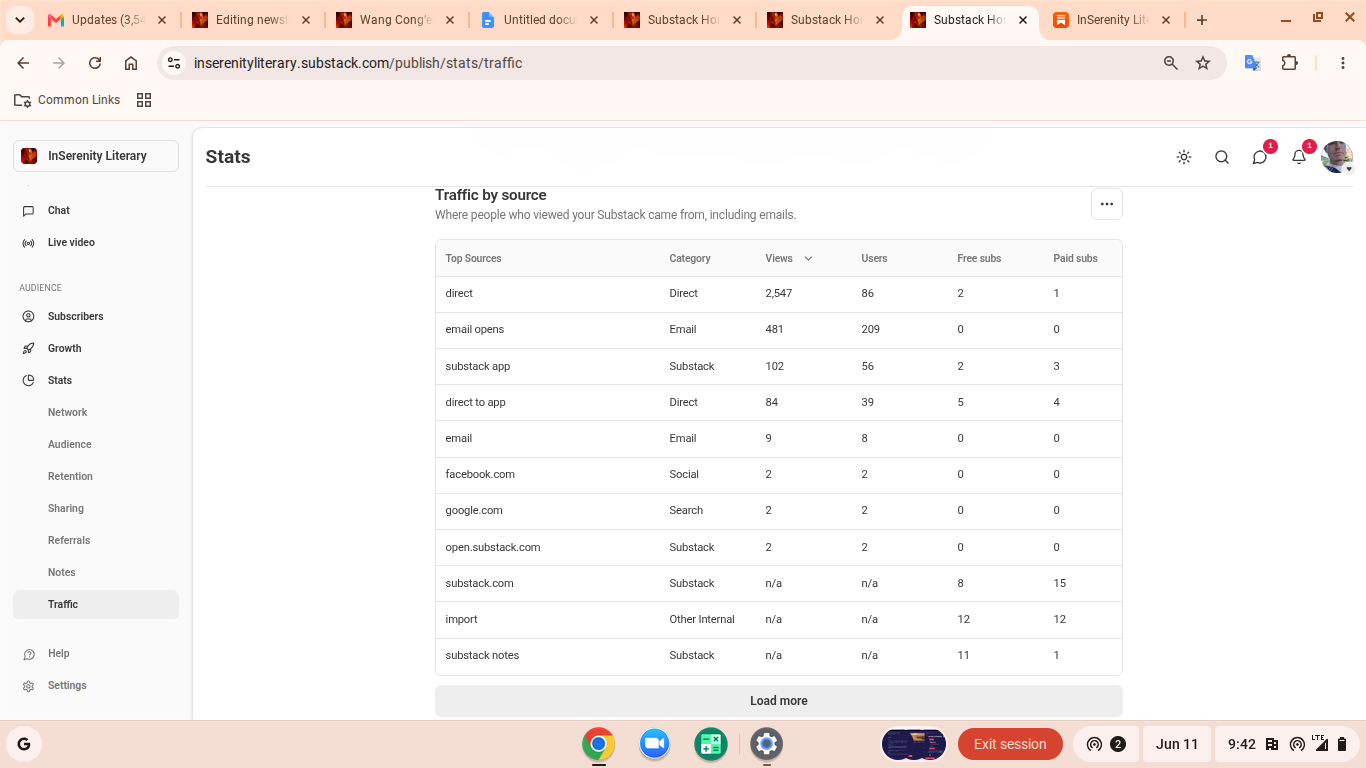
If you look at this chart 2577 views- the high majority are coming in direct. This means that the exterior search engines are finding my posts and people are coming to my site by clicking a link through one of the external sites.
Note that my second highest is 481 Substack emails opened.
You can also see direct hits from google and other sites- these seem considerably low- but considering a world market, when people login via a VPN or incognito mode, this will not register information like which engine it is coming though.
Now let’s view the traffic since my initial April 30th launch:
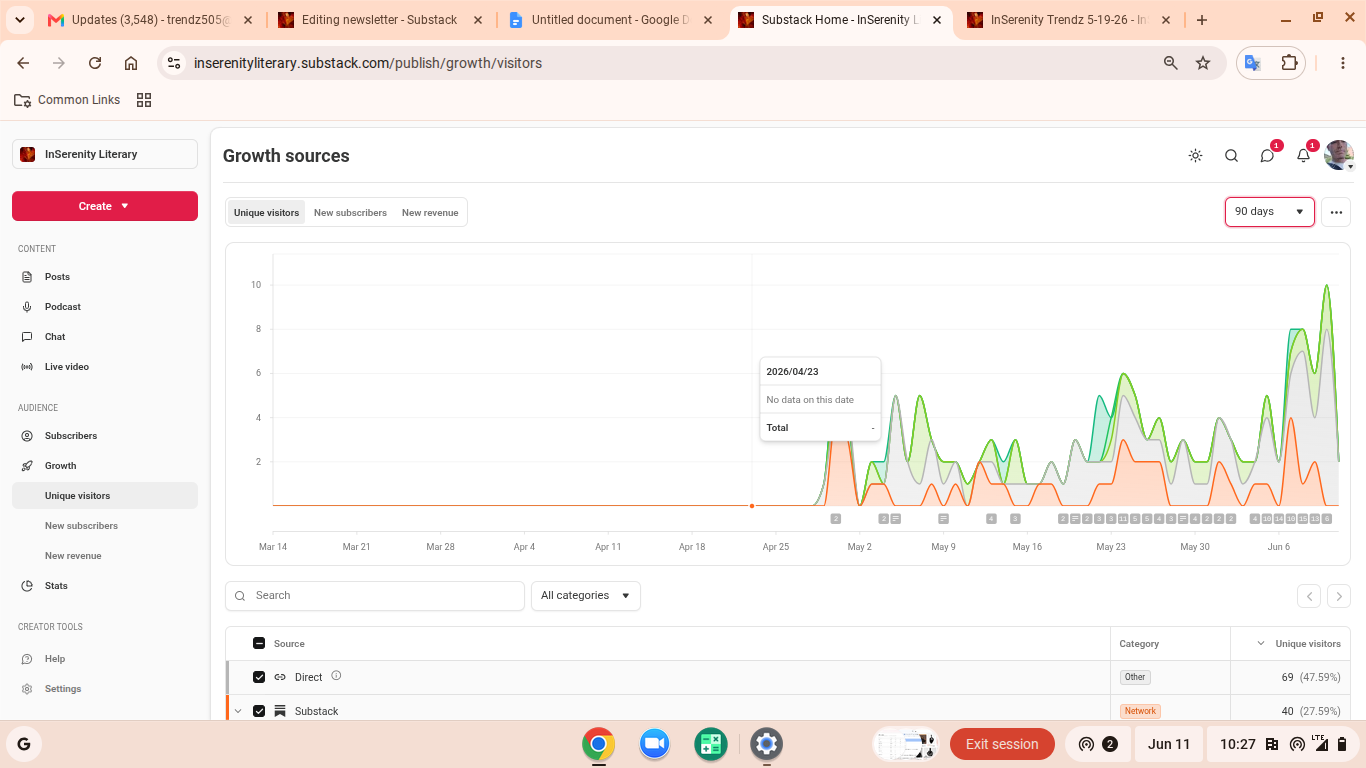
Can you see the %’s where the hits are coming from?
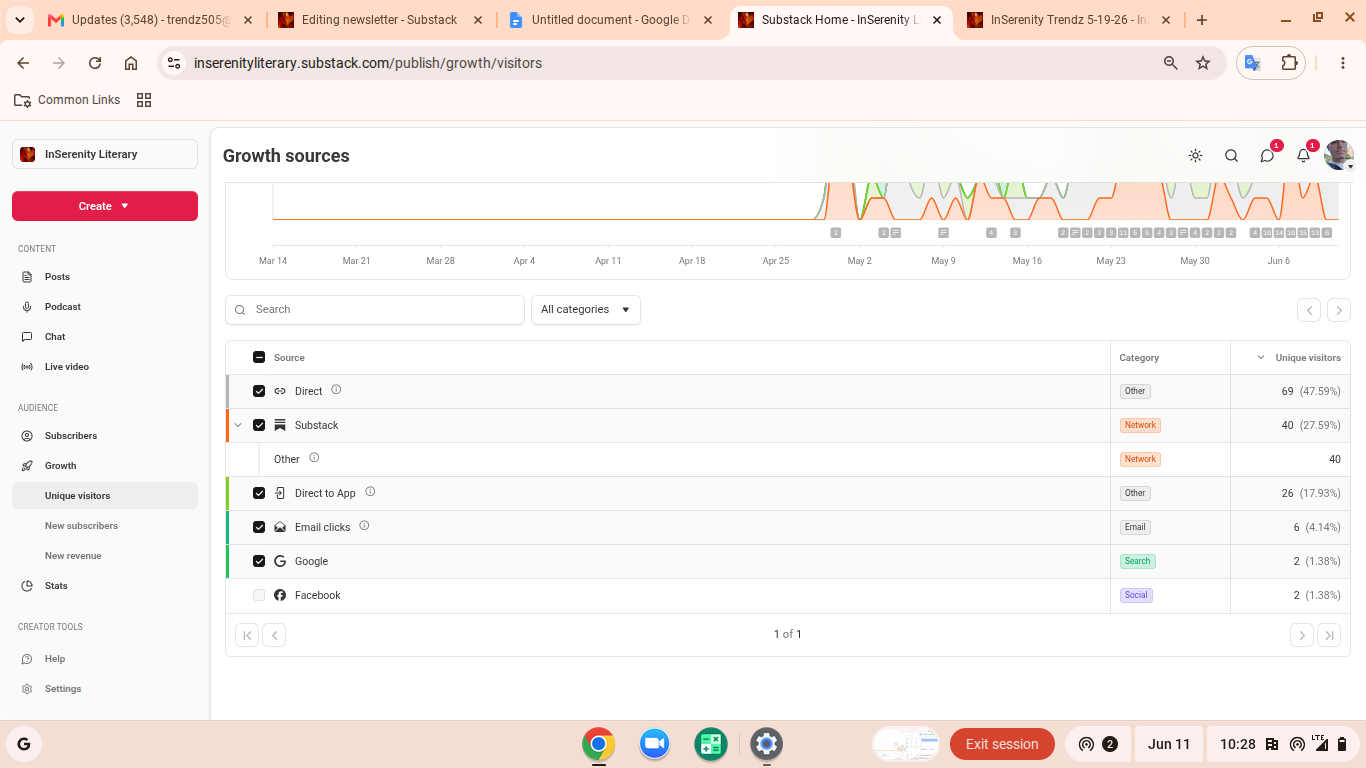
So.. I wanted to share this as the initial kick off. This next menu is quite important, you will find it in your settings tab on the article editor- scroll down to SEO options- this places your title and just junk. This is literally an acronym for “SEARCH ENGINE OPTIMIZATION”.
So… If you’re missing this, well do the math.
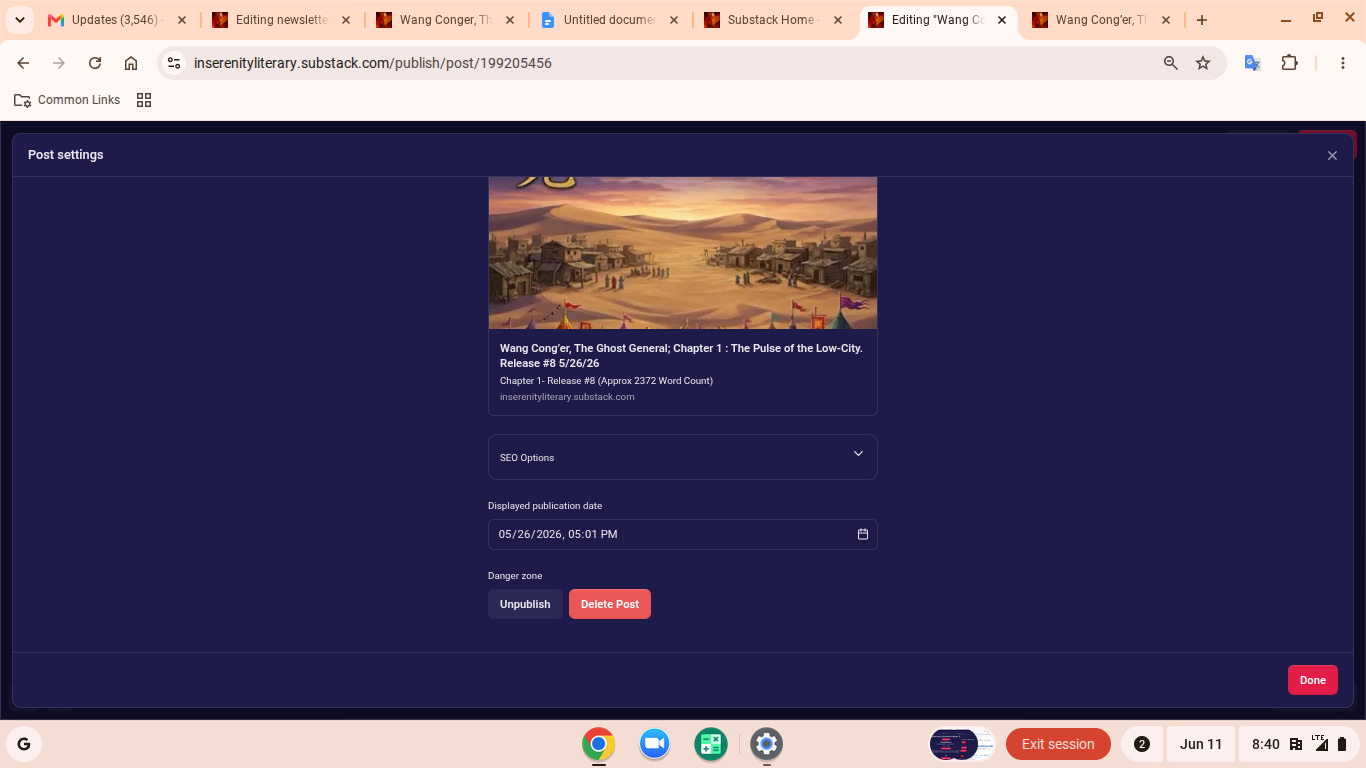
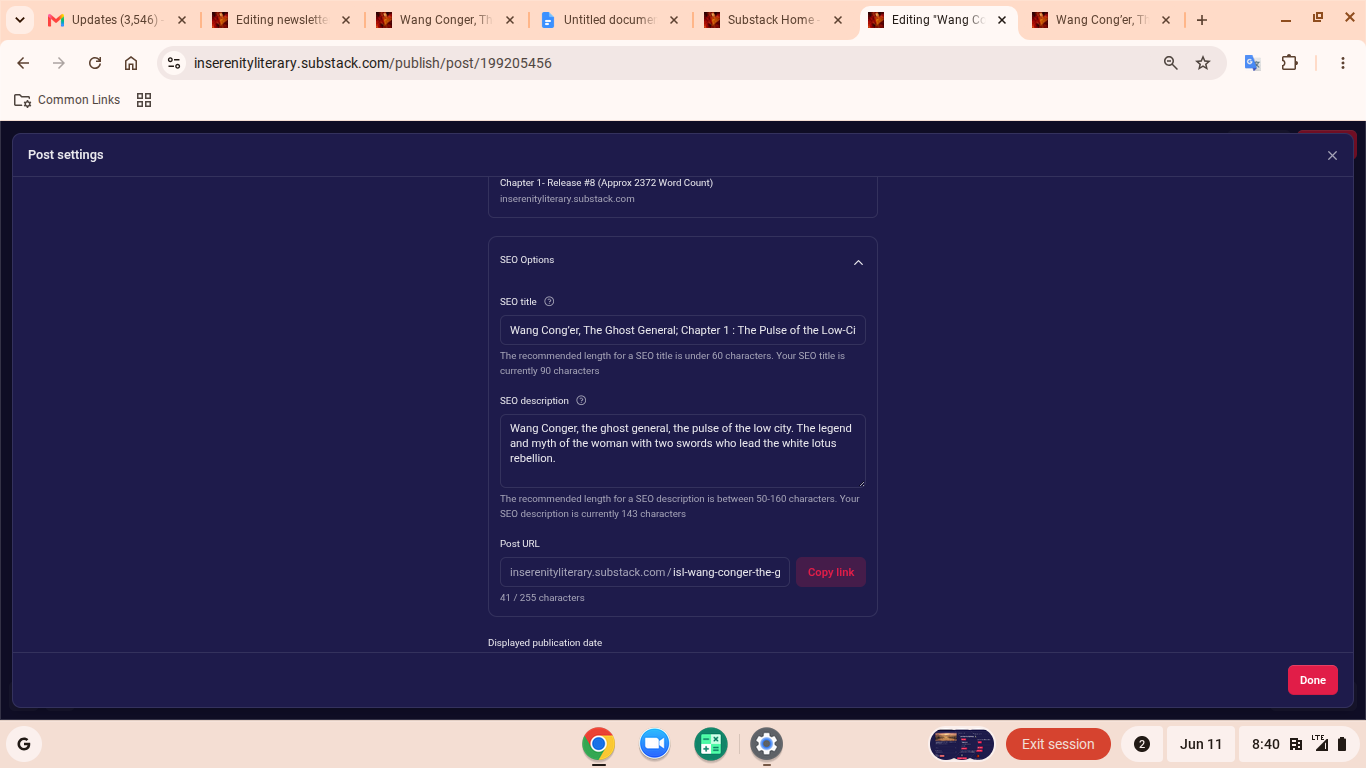
There are 2 boxes in here, the top box you have a 60 character max, write this as a title using as many KEYWORDS about your subject you believe others would type into a search engine.
The second box allows many more characters, fill this with a more detailed query write up of your subject, again using keywords for the engine.
When you add tags.. Do NOT load the box up, 5-6 tages directly related to your subject is what the engine will recognize, adding additional you will start getting flagged as spam and receive less placement in the ss algorithm placement order.
Where this will save you a ton of time, is when you realize you have published dozens of articles and hundreds of notes, and you are looking back to link them together, or add your buttons to create more engagement, not to mention, many just miss the creative ways to use them.
I will be writing further on some testing I am doing and other findings and be publishing them in a similar fashion to this.
Don’t Pay the AI Guru for the bad multiplicity copies his AI is marketing you.
I’ll post my findings here for free, hopefully some others will chime in.
Leave a comment or critique on this release below:
Wang Cong’er was a late 18th century warlord I have written about:
I also study and experiment with hyperbolic math in several applications including psychology, psychometrics, graphic design and hologram projection:
There is a building gallery of personal and soon to be other artists, some with iconic characters back history and creation stories:
Some information about my setup and start up here on Substack:
InSerenity Literary
InSerenity Literary and Artwork’s main content is always free.
Help support my work by leaving your perspectives and appropriate link sharing.
⌛Drop a link on all your favorite platforms. ⌛
inserenity857@gmail.com
InSerenity Literary (ISL): Solo and Independently run.
Boston, MA 2026
Insights on independent publishing, literature, creative strategies/design, and local Boston writer & artist initiatives: writing, art, music, science, mathematics.
⌛
no peeking